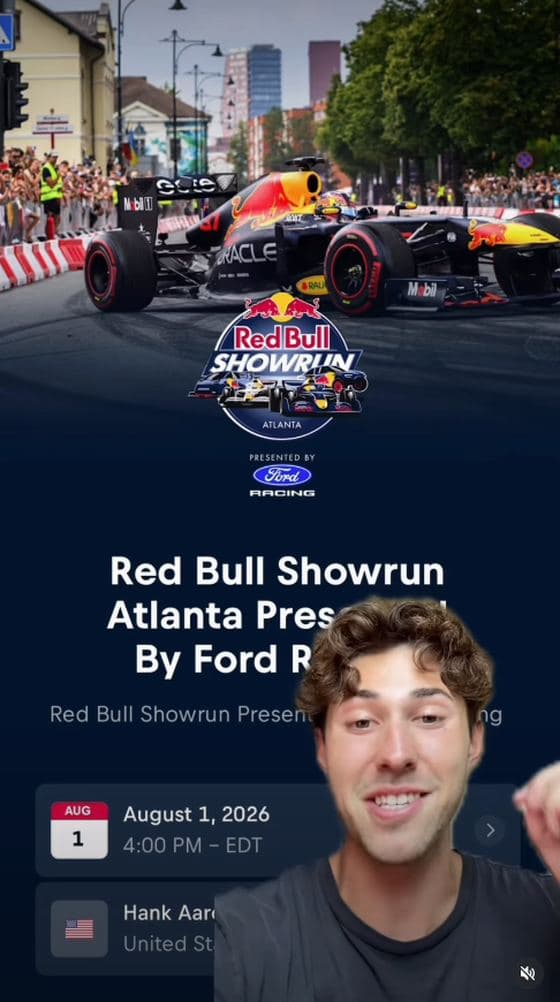
 Good
GoodRed Bull Showrun reaction
Face on camera, reacting to a real event in the app. It feels like he’s telling a mate, not reading an ad.
face on cameraapp on screennatural delivery
Watch on Instagram Creator brief · UGC campaign
You make the video: your car, your city, your community. Original content. Real people. No clipping, reposts or faceless edits.
$2 per 1K views
up to $750 per post · $2 minimum
TikTok + Reels
Make it vertical
15+ seconds
25–45 is the sweet spot
Your community
One clear invitation
Rates come from the live Content Rewards campaigns. Budgets are limited, so check the campaign for what’s left. Read the terms
00
Your people are out there. Give them a place to meet.
LiveMap is the app for car people: car meets, convoys, events and communities, all on a map of your city. Think posts, threads, channels and DMs.
The main ask
Start your own community in the app. Bring your audience into it.
You built something. It’s early. They can be part of it. That’s the video.
Pick an angle. Shoot it your way. Make people curious about LiveMap and want to download it. Post it and submit on Content Rewards. This campaign is for original creator content, not clipping.
01
A quick pre-flight check before you hit record.
01
Put https://www.livemap.co/download in your bio.
02
You on camera, speaking naturally. No faceless edits, AI presenters or borrowed voices.
03
Film something new for this campaign. Your footage, your perspective. No clips or reposts.
04
Show the app for at least 3 seconds in total, including one clear shot of 1.5 seconds or more.
05
Say your community’s name, show it in the app, and tell people why they should join.
06
Give people a reason to keep watching in the first 3 seconds. Skip the long introduction.
07
End with one action: join your community, sign up, or come to the next meet. Make it easy.
08
Say and show “Ad” or “paid partnership with LiveMap” in the first 5 seconds. Start the caption with #ad, include #LiveMap, and use the platform disclosure.
09
At least 15 seconds. Aim for 25–45 seconds, vertical 9:16, clear audio and a minimum of 720p.
10
Have your audience-country analytics ready. Send the video’s analytics screenshot 7 days after posting.
11
Use music you have rights to. Film parked, protect people’s privacy, and never handle a phone while driving.
02
One idea per video. Pick the one that feels most like you.
Angle 01
Start hereYou built your own space. It’s early. Being one of the first means something.
Angle 02
The next meet starts in your community. Everyone rolls out together.
Angle 03
For people who aren’t only car people. Your group chat, out in the real world.
03
A face. Some energy. The app on screen. Watch these before you shoot.
GoodFace on camera, reacting to a real event in the app. It feels like he’s telling a mate, not reading an ad.
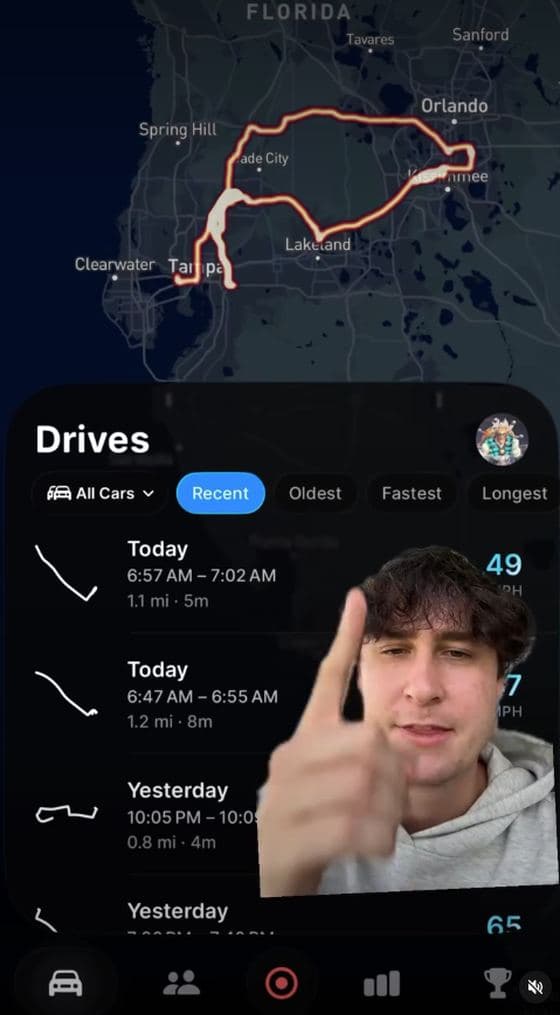 Good
GoodHe uses the app on camera and points out what matters. A real person showing a real reason to download it.
 Avoid this
A phone screen with no person explaining what we’re seeing, and no action to take at the end.
 Avoid this
A dashboard shot isn’t a story. No face, no clear ask, and unsafe phone use while driving.
 Avoid this
A feature on a dark screen, without a person, a story or a reason to join.
04
Not a script to read word for word. Add your city, your community and your own voice.
01 · Your community
I’ve been wanting my own space for the car community, so I finally built it. It’s on LiveMap, the app for car people. My community is called [COMMUNITY NAME]. I’ll be in there sharing my builds, planning meets and organising convoys. It’s small right now, but that’s the point. Get in early. It’s free, the link is in my bio. Come be one of the first.
01 · Your community
The car scene can be lonely when you’re starting out. You build a car you’re proud of, then realise you’ve got nobody to drive it with. So I started [COMMUNITY NAME] on LiveMap. Meets, convoys and actual people near [CITY] who are into the same stuff. Nobody should be doing this alone. Join my community. It’s free, and the link is in my bio.
02 · Convoys & meets
I’m planning the next meet, and this time we’re rolling out together. On LiveMap I can drop a destination, share the route and get everyone into a convoy. The whole thing is organised in my community, [COMMUNITY NAME]. Here’s where we’re meeting in [CITY]. If you want to be there instead of seeing the pictures tomorrow, join the community. Link in my bio.
03 · The everything app
Imagine Discord and a map had a baby. That’s LiveMap. You’ve got communities, channels, threads and DMs, but they’re connected to an actual map of your city. Food spots, events, meetups. A reason to go do something instead of just chatting about it. I’ve started [COMMUNITY NAME] in [CITY]. Come join us. It’s free, link in my bio.
05
Small creative decisions make a big difference.
What works
“I finally built my own space for the car community.”
A real motive, and a face to connect with.What doesn’t
“Hey guys, welcome back. Today I wanted to talk about this new app…”
A long introduction before anything happens.What works
Open your community. Show tonight’s meet. Actually use the map.
Let people see what they would be joining.What doesn’t
A blurry phone in the corner, or a quick flash of the App Store.
A mention is not a demonstration.What works
“Join [COMMUNITY NAME] on LiveMap. Link in my bio.”
One action, with a reason to take it.What doesn’t
“Follow, subscribe, comment your car, join Discord, check out the app.”
Too many asks means none of them land.06
What matters: real sign-ups and community joins, not just a number on a view counter.
07
The original documents, in one place. No fine print hidden behind a button.
Read the original documents below. This page doesn’t replace the agreement, confirm eligibility or promise a payout.
01 / The creative
Original PDF · 6 pages · opens in a new tab
02 / The agreement
Original PDF · 7 pages · opens in a new tab
Questions about the campaign or the terms? Email creators@livemap.co
08
Review the agreement, register with your Whop username, and bring your community to LiveMap.
Make it official
Review the original agreement, then sign with your full legal name when registration opens.
Original PDF · version 2026-09-24
Checking whether registration is open…
How it works