Module 01
Campaign rules and guidelines
The rules, the payout rates and how to get approved.
The goal of this campaign is to create original car slideshows around LiveMap. Your content should introduce viewers to the app and drive downloads through your tracked link in your bio, the pinned comment, and (sometimes) a text hook on the video itself.
Read every rule. We enforce all of them. A post that breaks a rule isn’t approved or paid.
Rules (must follow)
- You must be 18 or older to take part.
- Your content must be car-focused.
- Run or build a dedicated car page on TikTok or Instagram.
- Only submit original car slideshows. No reposts or low-effort content.
- 40% or more of your viewers must come from the USA and Canada.
- Content must show LiveMap in a positive way.
- Follow the instructions in every module.
- A dedicated page is required.
- To get approved, send an analytics screen recording in the campaign chat, or to creators@livemap.co.
- Posts can be rejected for being low quality, unrealistic or hard to understand.
- Posts can be rejected if they get no profile views or aren’t made to get clicks.
Never submit: botted views, fake engagement, stolen clips, blurry exports, or misleading claims.
Payouts
| Item | Details |
|---|---|
| Rate | $1 per 1K views on TikTok and Instagram |
| Minimum payout | $1 |
| Maximum payout | $250 per post |
Leaderboard bonuses
The top 3 creators on the Clipper leaderboard win a bonus on top of their view payouts:
| Place | Bonus |
|---|---|
| 1st | $1,000 |
| 2nd | $500 |
| 3rd | $250 |
Join the campaign and submit your posts on Content Rewards:
Content Rewards: join and submit your postsCampaign chat: talk with the team and other clippersCampaign reference (Notion)Content style
Your content should:
- Only include car content
- Feel natural and native to car pages
- Not feel like an advertisement
- Use original slideshows only
For formats, examples, and ideas, see the Format bank.
Link in bio
| Platform | What to put in your bio |
|---|---|
| Your tracked link from the Clipper leaderboard | |
| TikTok (link allowed) | Your tracked link from the Clipper leaderboard |
| TikTok (no link) | Search “LiveMap: Drive & Connect” on the App Store or “LiveMap” on the Play Store |
Installs only count toward the leaderboard bonuses when people use your tracked link. You get it once with your Whop username. Entering the same username again gives you the same link.
See Account setup for the full bio guide.
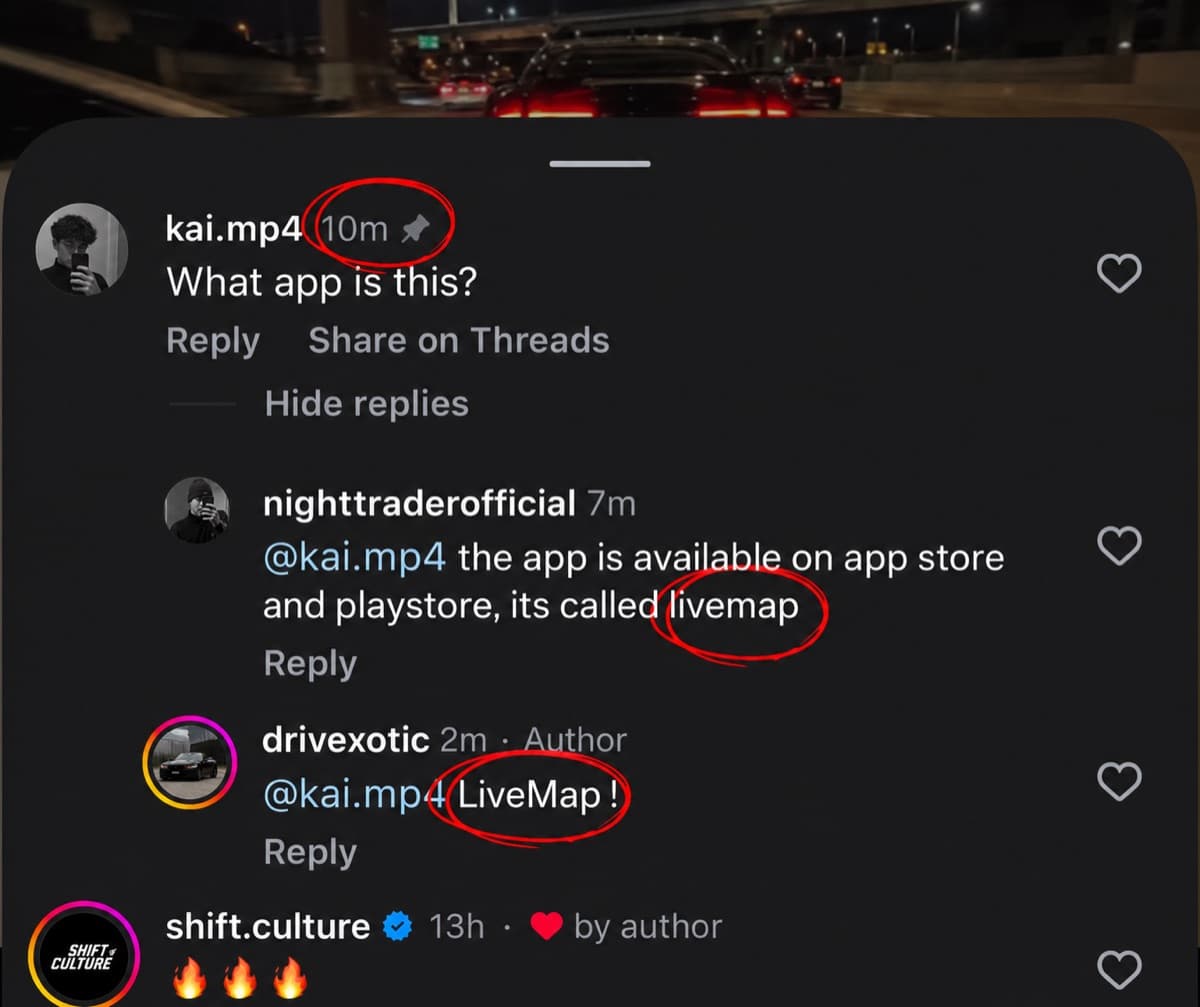
Comment call to action (required)
Mention LiveMap in the comments naturally. Do not make it sound like an advertisement.
| Method | What to do |
|---|---|
| 1. Alt account | Comment "what app is this?" from an alt account. Reply with the response below and pin your reply. |
| 2. Friend | Have a friend comment asking what app it is. Reply with the response below and pin your reply. |
| 3. Yourself (last resort) | If nobody asks, comment the app name yourself and pin your comment. Example: "Btw guys the app name is LiveMap, it’s available on the App Store and Google Play." |
What to reply:
The app is called LiveMap. It’s available on the App Store and Google Play.
Make sure the reply feels natural. Here is a real example: